Robotics & AI Lab

Not just a lab: a life-skills program for Grades 3 to 9.

A grade-wise journey from first gears to real AI projects, with kits, curriculum, teacher training and support that keep the lab running after year one.

anylan-lab · kit ladder● grades 3–9
Every activity fits one 40-minute periodGrade by grade ↓
20activities a year, Grades 3–8 (Core track)
40 minlessons that fit a normal school period
10stages in every lesson, the same every time
Every 5thsession is a scored team challenge

Source: curriculum overview, Grades 3–9

What is a Robotics & AI Lab?

Anylan Foundation's Robotics & AI Lab is a CSR-funded STEM lab program that sets up and runs robotics labs in government schools in Madhya Pradesh and Maharashtra. Students in Grades 3 to 9 build robots, code with blocks in Hindi, Marathi or English, and move on to Python and AI from Grade 6. Every lab includes kits, teacher training, on-site support and impact reports for the funder.

Who it's for
Government and low-resource schools, Grades 3–9
Where
Madhya Pradesh and Maharashtra; also Chhattisgarh, Gujarat, Rajasthan and Uttar Pradesh
Funding
CSR, Schedule VII (ii) education
Support term
1, 2 or 3 years
The problem it solves

Technology to build, not just to watch.

Today

Most children in government schools meet technology as something to watch, not something to build. And many school robotics labs fade after the first year: the kits are there, but the confidence to use them isn't.

With this lab

Every child builds, codes and presents, every week, in lessons that fit the timetable. Teachers are trained before the lab opens, and the lab is planned to keep running in year two and beyond.

What's included

Everything a lab needs to keep working.

One program, not a box of kits: what students use, what teachers get, and what you and the school can count on.

For students

  • Kits that grow with the childJr Construction Kit and Primo in Grades 3–4, the Ultima Lite controller from Grade 5. The Full Lab adds Snap Circuits and Arduino.Jr Construction→Primo→Ultima Lite→Arduino · Full Lab
  • Coding from blocks to PythonBlocks in Groblox (based on Scratch) and Mcode (based on Microsoft MakeCode) through Grade 5, then Python, Teachable Machine for AI and MIT App Inventor. Groblox, Mcode and Teachable Machine all run offline.
  • Block coding in their own languageHindi, Marathi or English blocks. Text coding in Python is in English.
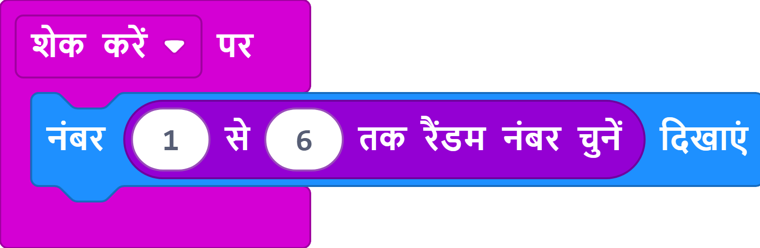
    हिंदीHindi block: show number, pick random 1 to 6
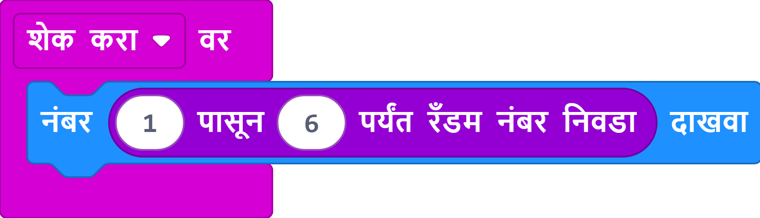
    मराठीMarathi block: show number, pick random 1 to 6
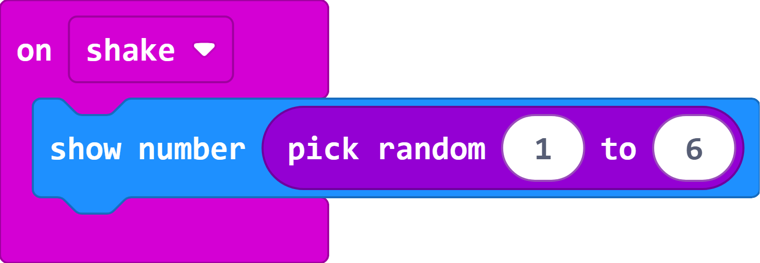
    EnglishEnglish block: show number, pick random 1 to 6
  • Lesson workbooksIn English for Grades 5–8, and in Hindi and Marathi for Grades 5–6. See a sample ↓

For teachers

  • Teacher trainingBefore the lab opens, with refreshers during the year.
  • Virtual Master TrainerA teacher-facing video for every lesson.
  • A full-year plan for every gradeAligned to NEP 2020 and NCF-SE 2023.
  • Resource person on siteHands-on support in the school, where the program includes one.

For you and the school

  • Works offline, on any deviceRaspberry Pi, tablets or Windows PCs as coding terminals. No internet needed.
  • AssessmentBaseline, midline and endline, on the skills in the pathway.
  • Reports your board can readProgress, learning outcomes, photos, attendance and a utilisation certificate.
  • Repairs and sparesHandled locally.

The kits students use

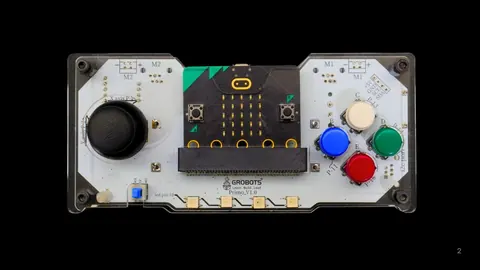
Primo controller with a joystick, four coloured buttons and an LED grid
Grades 3–4PrimoA gamepad-style controller with a joystick, buttons and an LED grid.
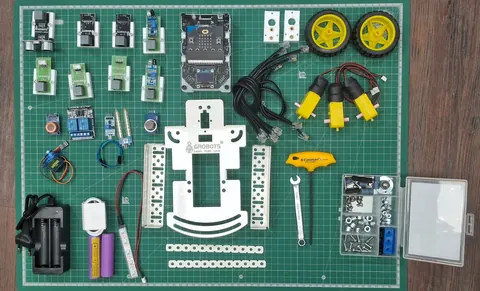
Ultima Lite kit laid out: controller, sensors, motors, wheels and chassis parts
Grades 5–8Ultima LiteThe controller, sensors, motors and chassis parts in one kit.
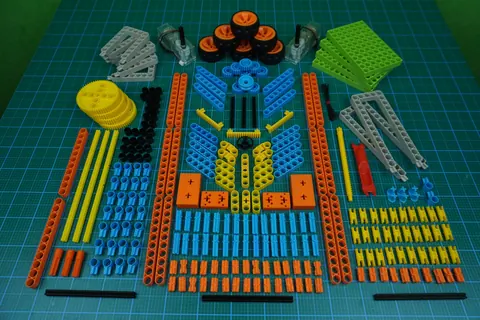
Construction kit pieces: beams, gears, wheels and connectors in many colours
Mechanisms kitBeams, gears and connectors for building machines by hand.
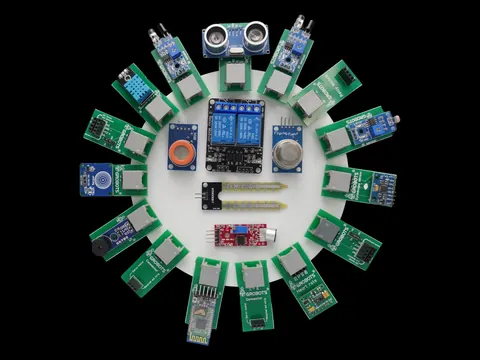
A ring of sensor modules including an ultrasonic distance sensor and a relay
Sensors packLight, sound, distance, temperature and more, each on its own module.

Kits by Grobots, the robotics brand of our implementation partner. Product photos.

Grade by grade

What will students learn in each grade?

Every grade has its own theme and about 20 activities, and every fifth session is a scored team challenge. Each activity is written as an outcome: what the child can do afterwards.

Core · Track 1

The full program on the core kits: Jr Construction Kit, Primo and Ultima Lite. 20 activities a year, Grades 3–8. No extra hardware.

Full Lab · Track 2

Everything in Core, plus Snap Circuits (Grades 3–6) and Arduino (Grades 7–9), ending in a Grade 9 year of innovation and tinkering.

  1. Gr 3–4Groblox (Scratch-based)
  2. Gr 5Mcode (MakeCode-based) on a real controller
  3. Gr 6–8Python + AI
  4. Gr 7–9Arduino + C Full Lab
Grade 3

Machines in My Playground & Home

Jr Construction Kit + Primo · Groblox (Scratch-based)Core 20 · Full Lab 25 activities
  • Guided
    My First Push CarJCK

    Can build a push car that rolls straight, and name the axle and chassis.

  • Guided
    Hello Scratch: Make the Cat DancePrimo · Groblox

    Can make a sprite respond: WHEN this happens, DO that.

  • Guided
    Construction CraneJCK

    Can build a crane that lifts a load without tipping, using a counterweight.

  • Guided
    Traffic Light GamePrimo · Groblox

    Can code a timed light sequence: red, then amber, then green.

  • Guided
    Kitchen Grinder: GearsJCK

    Can gear a motor down for force, and explain why slower means stronger.

  • Challenge
    Robot Talent ShowJCK + Primo

    Team presents a build-plus-code act: the year, consolidated on stage.

Vocabularyaxle · chassis · fulcrum · gear ratio · linkage · sprite · loop · variable

6 of 20+ activities shown. Request the full curriculum →

Grade 4

Mechanisms That Work for People: Sense & Respond

Jr Construction Kit + Primo · Groblox (Scratch-based)Core 20 · Full Lab 25 activities
  • Guided
    Auto Street Light: Code ItPrimo · Groblox

    Can make a lamp switch itself on at dusk: the first IF-ELSE decision.

  • Guided
    Sound-o-Meter: Silent ClassPrimo · Groblox

    Can turn noise levels into categories a class can see.

  • Guided
    Earthquake AlarmPrimo · Groblox

    Can detect a shake, and tune how sensitive the alarm is.

  • Guided
    Fever Scanner BuddyPrimo · Groblox

    Can band temperature into normal and fever: ranges from continuous data.

  • Guided
    Radio Pen-PalsPrimo · Groblox

    Can send a message between two devices by radio.

  • Challenge
    Smart Railway CrossingJCK + Primo

    Team automates a crossing in the safe order: warn first, then close.

Vocabularysensor · threshold · if-else · calibrate · accelerometer · transmitter · receiver

6 of 20+ activities shown. Request the full curriculum →

Grade 5

From Screen to Board: Programming a Real Controller

Ultima Lite · McodeCore 20 · Full Lab 24 activities
  • Guided
    Digital DiceMcode · accelerometer

    Can roll a fair dice in code: randomness within a range. See the full lesson ↓

  • Guided
    Night LightMcode · light sensor

    Can code a night light with a threshold and if-else.

  • Guided
    Step CounterMcode · accelerometer

    Can count steps: accumulating a value over time.

  • Guided
    Square Path BotMcode · motors ×2

    Can drive a robot in a square: loops plus calibration.

  • Guided
    Obstacle AvoiderMcode · ultrasonic + motors

    Can code a robot that steers itself around obstacles.

  • Challenge
    Silent Classroom AlarmMcode · microphone

    Team calibrates an alarm from real classroom noise, and deploys it.

Vocabularyinput · output · event · random · variable · threshold · infrared · ultrasonic

6 of 20+ activities shown. Request the full curriculum →

Grade 6

Automation, First AI Models and First Text Code

Ultima Lite · Mcode, Teachable Machine, PythonCore 20 · Full Lab 24 activities
  • Guided
    Smart FanMcode · temperature + motor

    Can control a fan from temperature with if-else.

  • Guided
    Line Follower BotMcode · IR ×2 + motors

    Can calibrate a robot to follow a line: a closed loop.

  • Guided
    AI: Emotion ClassifierTeachable Machine

    Can show why sample quality decides model quality.

  • Guided
    AI: Plant Leaf HealthTeachable Machine

    Can handle input the model was never trained on: the fallback.

  • Guided
    Python: Introduction to DisplayPython · OLED

    Can write first text code, and read an error message.

  • Challenge
    Smart School Bell SchedulerMcode · buzzer + timer

    Team schedules the school's own bells: timing as code.

Vocabularystate · AND / OR / NOT · truth table · servo · model · training sample · syntax

6 of 20+ activities shown. Request the full curriculum →

Grade 7

Control Systems, Applied AI and Python

Ultima Lite · Mcode, Teachable Machine, PythonCore 20 · Full Lab 24 activities
  • Guided
    Smart DustbinMcode · ultrasonic + motor

    Can open a lid on approach, with a hold so it doesn't flap.

  • Guided
    Smart IrrigationMcode · light + servo/pump

    Can water by proxy sensing, and say where the proxy fails.

  • Guided
    AI: Object SorterTeachable Machine · servo

    Can let a model drive a servo, and weigh the cost of a wrong action.

  • Guided
    Python: Temp ConverterPython · temperature + display

    Can write a function that returns a converted value.

  • Full Lab
    Arduino 1: Simulate, Then BuildArduino + Tinkercad

    Can simulate a circuit in Tinkercad, then wire the first bare LED.

  • Challenge
    Digital Visitor CounterMcode · IR ×2

    Team reads direction from sensor order, debounced.

Vocabularylatch · fail-safe · debounce · label · list · while loop · function · breadboard

6 of 20+ activities shown. Request the full curriculum →

Grade 8

Python, Applied AI and Systems

Ultima Lite · Python, Teachable Machine, MIT App InventorCore 20 · Full Lab 24 activities
  • Guided
    Python: Obstacle AvoiderPython · IR + motors

    Can code sense-decide-move autonomy in text.

  • Guided
    AI: Helmet DetectorTeachable Machine · printed cards

    Can build two-class detection with a fallback.

  • Guided
    AI: Voice Controlled CarSpeech AI · mic + motors

    Can command a car by voice, and default to safe.

  • Guided
    MIT App: Bluetooth CarApp Inventor · Bluetooth + motors

    Can build a phone app that drives the robot: two systems talking.

  • Full Lab
    Arduino 5: The RelayArduino · relay + lamp

    Can switch a real load a pin can't, through a relay.

  • Challenge
    AI: Plant Parts IdentifierTeachable Machine · printed cards

    Team ships a multi-class model with a fallback.

Vocabularymodulo · flag · safe stop · sample quality · pairing · protocol · relay · Boolean logic

6 of 20+ activities shown. Request the full curriculum →

Grade 9

Innovation & Tinkering: Complete Machines on Arduino

Arduino Tinker Kit + Tinkercad · Full Lab only22 activities
  • Guided
    Analog Sensing: LDR + Voltage DividerArduino · LDR

    Can condition a signal with a voltage divider.

  • Challenge
    Environmental MonitorArduino · 3+ sensors + LCD

    Team integrates three sensors into one dashboard, and sanity-checks it.

  • Guided
    The Autonomous RobotArduino · chassis + sensors

    Can assemble full sense-decide-act autonomy from components.

  • Challenge
    Keypad PIN Door LockArduino · keypad + servo + LCD

    Team builds keypad access control: matrix scanning.

  • Capstone
    Project: Build & CalibrateArduino · student's choice

    Team builds and calibrates its own machine, end to end.

  • Capstone
    Present and DefendArduino · student's choice

    Can present evidence, and defend the machine's limitations to an audience.

Vocabularyvoltage divider · H-bridge · PWM · hysteresis · requirement · calibration · edge case · robustness

6 of 22 activities shown. Request the full curriculum →

Source: curriculum overview, Grades 3–9, developed with our implementation partner

Program highlights

Designed for real government schools.

Fits the timetable

Every activity finishes in one 40-minute period.

Grade-wise, not one-size

Complexity grows with each student's readiness.

Language is no barrier

Multilingual block coding, plus Hindi lesson videos and workbooks.

Built for rural realities

Works offline on Raspberry Pi, tablets or Windows, with solar options where power is unreliable.

Competition-ready

Students take projects to science exhibitions and robotics competitions.

Measured from day one

Learning metrics your board can read, from baseline to endline.

Plan a Robotics & AI Lab

Tell us how many schools and where.

We'll send a quote and offer you a visit to a working lab.

Send us your enquiry

Message us on WhatsApp or email us with your organisation, the number of schools and the region you have in mind. We'll reply with a quote.

Or call Sapan Jain on +91 70242 30852.

Sample lesson

A real lesson, start to finish.

Grade 5 · Session 3 · Digital Dice, taken from the student workbook. Every lesson follows the same ten stages, so a teacher without a coding background is never improvising, and each stage builds a step of the Robotics Learning Pathway.

Grade 5 · Session 3 · Digital Dice
Stage 01 · Pathway: Mission

Mission Brief

Have you ever played Ludo or Snakes and Ladders with your friends and needed a dice to move your piece? Sometimes a real dice can get lost, right?

Mission: Today, you will program your Ultima Controller to become a super cool digital dice that shows a random number when you shake it!

Stage 02 · Pathway: Components

How it Works

InputShake

Detects when the Ultima Controller is shaken, just like you shake a real dice in your hand.

ProcessUltima Controller

Thinks about the shake, then quickly picks a random number from 1 to 6. This is where your code runs!

OutputLED Grid

Displays the random number on its bright, glowing lights, so everyone can see your dice roll!

Stage 03 · Pathway: Components

Visual Inventory

  • Ultima Controller x1The Brain of Your Robot
  • USB Cable x1The Robot's Lifeline
Stage 04 · Pathway: Build

Build Your Robot

  1. Connect Your Ultima Controller
  2. Open Your Digital Playground
  3. Start a New Project
  4. Fill Your Canvas with Code Blocks
Stage 05 · Pathway: Brain Blueprint · Code

De-Coding the Logic

Digital Dice code blocks
  1. 'on shake' Block: The Listener!

    Just like you learned about using buttons as inputs in 'My Reacting Robot!', the on shake block is an event. It tells your Ultima Controller: 'Hey, when someone shakes me, listen up and get ready to do something!'.

  2. 'pick random 1 to 6' Block: The Dice Roller!

    This smart purple block is like a tiny brain that picks a random number for you. It's just like rolling a real dice – you never know what number you'll get, but it will always be between 1 and 6!

  3. 'show number' Block: The Display!

    After picking a random number, the show number block tells your Ultima Controller to display that number on its bright 5x5 LED Grid. This is similar to how you displayed text on the built-in OLED in 'My First Talking Screen', but now we're using the LED Grid to show numbers!

Stage 06 · Pathway: Observe Output

Expected Output

When you shake your Ultima Controller, a random number between 1 and 6 will appear on its glowing LED grid.

Stage 07 · Pathway: Debug

The Debugging Zone

If your digital dice isn't working or showing numbers, don't worry! Robots sometimes need a little help. Check these things:

  • Is your Ultima Controller properly connected to the computer with the USB cable? Sometimes a loose connection can stop it.
  • Did you download the code (the .hex file) and copy it to your Ultima Controller? Check your downloads folder and ensure the file was dragged to the microbit drive.
  • Look at your code in the Mcode editor. Are all the blocks connected correctly, one inside the other, like building blocks? Make sure there are no gaps!
Stage 08 · Pathway: Level Up

Try On Your Own

Level 1Change the Dice Range

Can you make your digital dice roll numbers only between 1 and 3? (Hint: Look at the pick random block!)

Level 2Smiley or Sad Face Dice

Instead of numbers, can you make the LED Grid show a smiley face if the random number is an even number (2, 4, 6) and a sad face if it's an odd number (1, 3, 5)? (Hint: You'll need if/else blocks!)

Level 3Special Roll!

If you roll a 6, can you make the LED Grid first show a sparkle animation for a moment, and then display the number 6? (Hint: Look for the show leds block or show icon for animation and then show number!)

Stage 09 · Pathway: Level Up

Brain Tickler

What kind of action makes our digital dice show a number?

Stage 10 · Pathway: Level Up

Mission Accomplished

  • Understanding event-driven programming (like on shake)
  • Using random number generation in code
  • Displaying output on the built-in LED Grid
  • Creating interactive projects with your Ultima Controller

Engineer's Notebook: You've created a fantastic digital dice! How else could you use the 'shake' feature in your Ultima Controller? Can you think of a game or a useful tool that reacts to shaking?

Stage 1 of 10

From the Grade 5 student workbook: English, Hindi and Marathi editions. Teachers get a matching Virtual Master Trainer video for every lesson.

The Robotics Learning Pathway

Every project, eight stages. Every stage, a life skill.

Robotics is the tool, not the goal. See it as a journey on the homepage →

Stage 01

Mission

Turns ideas into critical thinking

Students
Plan an idea and explain it to their team
Skill
Critical thinking and problem-solving
Stage 02

Components

Builds initiative and leadership

Students
Take on a challenge and improvise with the parts at hand
Skill
Initiative, leadership and healthy risk-taking
Stage 03

Build

Makes collaboration visible

Students
Share the work, own a part and finish it together
Skill
Creative thinking, consistency and teamwork
Stage 04

Brain Blueprint

Develops self-direction

Students
Break a problem into steps and plan a systematic approach
Skill
Turning complex challenges into workable steps
Stage 05

Code

Makes computational thinking practical

Students
Program their build with logic, using blocks in their own language
Skill
Digital literacy, curiosity and computational thinking
Stage 06

Debug

Turns failure into resilience

Students
Test, fail, take feedback and improve
Skill
Persistence, patience, flexibility and resilience
Stage 07

Observe Output

Connects learning to communication

Students
See a working result and analyse why it works
Skill
Communication, cause-and-effect reasoning, presentation
Stage 08

Level Up

Builds confidence for what comes next

Students
Take projects to competitions and harder challenges
Skill
Confidence, ambition and a fighting spirit
In action

What a lab session looks like.

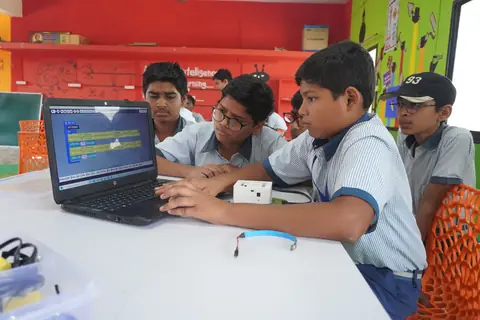
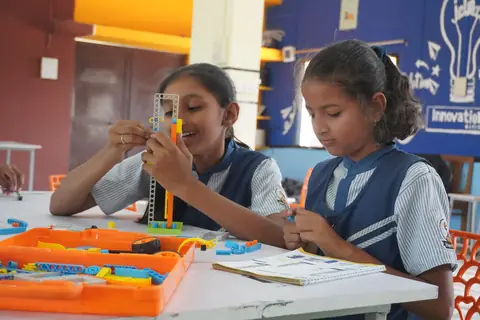
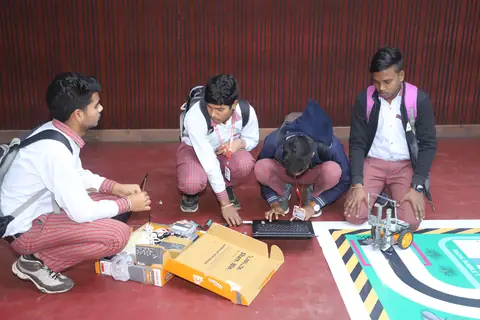
Children building, coding with blocks and making hardware respond. Tap a clip to play it.

Build: first models from the kit box
Code: blocks light up an LED tower
Debug: getting the fan to respond
Observe output: robots on the move
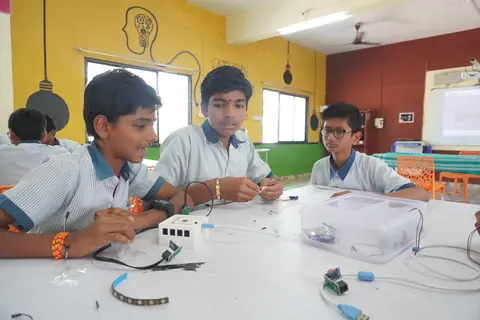
Three students assembling a circuit with sensors and cables
Components: assembling a circuit
Students coding a microcontroller board on a laptop
Code: programming a board
Two girls building a robot from a kit
Build: a robot, together
Students tuning their robot on a line-following competition mat
Level up: at a competition

Partner recordVideos: Umang project, Nagpur municipal schools. Photos: Atal Tinkering Labs in the partner's client schools. More on the partner page →

Impact reporting

What you'll receive, and when.

Every partner gets the same set of reports, ready for your CSR committee and annual report.

1Before the lab opens

Baseline report

Where students start, on the skills in the pathway.

2Through the year

Photos and attendance

From every school, so you see the lab in use.

3Mid-year

Progress report

Sessions held, attendance and midline results.

4End of year

Impact report + utilisation certificate

Learning outcomes from baseline to endline, and the certificate for your CSR records.

SDG 4Quality education
VII (ii)Schedule VII: education,
incl. vocational skills
NEPAligned to NEP 2020
NCFAligned to NCF-SE 2023
Questions

Robotics & AI Lab: common questions

Can CSR funds be used for a robotics lab in a government school?

Yes. Promoting education, including employment-enhancing vocational skills, is listed under Schedule VII (ii) of the Companies Act, 2013. Anylan Foundation is registered with the Ministry of Corporate Affairs to implement CSR projects (CSR-1: CSR00096762).

Is a Robotics & AI Lab the same as a STEM lab?

Yes. It is a STEM lab focused on robotics, coding and AI, where students use science and maths to build and program working machines. Schools that want a broader maker space can add the Innovation & Tinkering Lab.

Which grades is the Robotics & AI Lab for?

Grades 3 to 9. The Core track runs 20 activities a year in Grades 3–8. The Full Lab adds Snap Circuits and Arduino, and a Grade 9 year of innovation and tinkering.

What's the difference between the Core and Full Lab tracks?

The Core track runs the full program on the core kits (Jr Construction Kit, Primo and Ultima Lite) with no extra hardware. The Full Lab adds Snap Circuits for Grades 3–6, Arduino for Grades 7–9 and a Grade 9 innovation year.

Do students need to know English to learn robotics?

Not to start. Block coding works in Hindi, Marathi or English, so students learn logic in the language they think in. Text coding in Python, from Grade 6, is in English.

Is the AI part safe for children's data?

Yes. AI lessons use Teachable Machine built into the offline coding editors (Mcode and Groblox), so models are trained and run in the lab without the internet. Children train models on printed sample cards, not on real faces or personal data.

Does a school robotics lab need the internet or new computers?

No. Kits work offline, with Raspberry Pi, tablets or Windows computers as coding terminals, including ones the school already has.

Who teaches the robotics sessions?

The school's own teachers, trained before the lab opens and supported by a video for every lesson, plus a resource person on site where the program includes one.

What happens if lab equipment breaks?

Repairs and spares are handled locally.

How is learning in the lab measured?

Every lesson ends with a self-check and a short quiz, and every fifth session is a scored team challenge. Baseline, midline and endline assessments are reported to the CSR partner and the school.

How much does a Robotics & AI Lab cost through CSR?

It depends on the number of schools, the track (Core or Full Lab) and the support term (1, 2 or 3 years). Share your budget and region and we'll send a quote.